Enterprise AI built around your work
Enterprise AI solutions
Our consulting, builds and training run on solutions we built ourselves
A company AI gateway, AI that answers from your own documents, AI agents that carry out work, and a hands-on training platform. Instead of starting from scratch, we fit them to your business.
- A safe way inTS AI GatewayThe company gate that lets employees use AI with confidence.
- Leaks blocked
- Who used what
- Usage and cost by team
- Answers with sourcesTS AI EngineAI that never sends an answer without evidence.
- No evidence, no answer
- Shows its sources
- Your documents only
- Gets work doneTS AI AgentAI that carries out tasks from a message.
- One sentence to run
- Your systems stay
- Unsure? Asks a person
- Training platformTS ClassA hands-on training platform that lets one instructor run ten learners.
- Join with a course code
- Who is stuck shows first
- Checkpoints and grading
TS AI Gateway
TS AI Gateway solves the security, data-leak, cost and control problems companies hit when adopting AI
Bring in commercial AI as-is and the company can't tell who used what, which data left, or what it costs. TS AI Gateway handles, in one place, every point where adoption leads get stuck in security review and operation.
Requests from
- Employees
- In-house AI agents
- Business systems
- Scheduled jobs
TS AI Gateway
- 1Identity and permission
- 2Input check and de-identification
- 3Model routing
- 4Output check
- 5Logging and cost
Allowed
- Claude · GPT · Gemini
- In-house models
- Approved company data
Blocked
- Personal AI accounts
- Sites and APIs off the list
- Data outside permissions
On Google Cloud's enterprise infrastructure, these AI models connect through one company gateway




Usage history
Without: No idea who used what
Gateway: Every call logged, audit-ready
Confidential data leaks
Without: Contracts go out as-is
Gateway: Blocked or de-identified first
Training on your data
Without: May train on your data
Gateway: Only no-training routes
API key sprawl
Without: Keys scattered in code
Gateway: Keys only in the Gateway
Personal accounts
Without: Company can't even see it
Gateway: One company door
Access control
Without: Everyone sees everything
Gateway: Answers within permissions
Cost control
Without: Spend by team unknown
Gateway: Per-team totals, auto limits
Rogue agent calls
Without: Calls unapproved places
Gateway: Outside allow-list: cut
Unfounded answers
Without: Wrong answers in reports
Gateway: No evidence, no answer
Policy violations
Without: Banned phrases go out
Gateway: Checked before release
Model lock-in and outages
Without: Outage stops work
Gateway: Automatic failover
Security review
Without: Nothing to show review
Gateway: Review documents ready
Closed-network needs
Without: Can't use restricted data
Gateway: Closed network or hybrid
Existing subscriptions
Without: Each plan managed apart
Gateway: One layer in front
Details for each item
- Usage history
- No record of who sent what and got what back, so incidents can't be explained.Requests, responses, attachments and threads are kept with user, department, model and time, with separate viewing rights for audits.
- Confidential data leaks
- Contracts, customer lists and source code go straight to external models.Inputs are checked before sending, then blocked or masked. Higher-grade data is routed to in-house models.
- Training on your data
- Nobody can confirm whether submitted data is used to train models.Only enterprise routes that do not use your inputs for model training are connected.
- API key sprawl
- Keys are scattered across code and personal PCs; once leaked, no one knows who used them.Keys live only in the Gateway. Staff and agents never see them and call only through the Gateway.
- Personal accounts
- Staff use personal AI accounts and the company can't even see it.Personal AI accounts are blocked and use is gathered into one company door; unapproved services are detected.
- Access control
- Everyone reaches the same models and the same data.Requester, department and allowed scope are checked first, and answers use only data the person may see.
- Cost control
- Usage and spend by department are invisible, so budgets can't be set or recovered.Tokens and spend are tallied by user, department and project, with automatic stops at limits and a monthly report.
- Rogue agent calls
- Running agents call unapproved APIs, databases and sites.Each agent's reach is fixed by an allow-list; calls outside it are cut at the network layer.
- Unfounded answers
- Wrong answers flow straight into reports and external documents.Answers are checked against company documents and held back when evidence is insufficient.
- Policy violations
- Banned or exaggerated phrases slip into outgoing messages.Outputs are checked before release; flagged sentences are stopped and passed to a person.
- Model lock-in and outages
- Model changes, price rises and outages halt the work.Models change without touching business code, with automatic failover when one goes down.
- Security review
- There is nothing to show what leaves and how far, so review stalls.Data boundaries, log retention and deployment are documented for your review committee.
- Closed-network needs
- External APIs alone can't handle data that must not leave.Cloud, hybrid and closed-network setups share one structure, so you choose by data and can move later.
- Existing subscriptions
- Each Claude, GPT or Gemini subscription is managed separately.Keep your subscriptions and add the Gateway in front to secure logging, blocking and billing first.
TS AI Gateway runs on Google Cloud's enterprise infrastructure. The scope of each control is set to your standards during the diagnosis.
How it's used
How one request is handled
Staff ask in the messenger or on the web. The gateway checks permissions and confidential data, then the AI answers from company documents or acts in your existing systems.
Employees only get answers from material they're allowed to see.
TS AI Gateway
- Requester permission checked — Purchasing
- 1 supplier contact masked
- Routed to the company-contracted AI
TS AI Engine
Drafted the order at unit prices from Supplier A's price list (revised in September). Quantities match last month's order.
PriceList_SupplierA_Sep.xlsxPurchasing policy §12
TS AI Agent
Register draft PO in ERP Waiting for owner approval
01 · Enterprise
TS AI Gateway
The company gate that lets employees use AI with confidence.
Leaks blocked
Contracts and lists are masked or stopped before they leave
Who used what
Questions, attachments and answers are kept for any inquiry
Usage and cost by team
Stops at the limit, settled monthly
Same work, any model
If a price rises or a model fails, it switches over
When this fits
- Employees are using AI on personal accounts
- Internal review stalled over leakage worries
- AI spend is not visible by department
Technically
02 · Evidence
TS AI Engine
AI that never sends an answer without evidence.
No evidence, no answer
If evidence falls short, it holds instead of answering
Shows its sources
Every answer lists the internal documents it used
Your documents only
It searches your files and rules, not the internet
Works air-gapped
Runs on in-house AI with no outside connection
When this fits
- Answers must rest on rules, contracts or precedents
- You worry invented answers will reach a report
- Data cannot leave the company
Technically
03 · Execution
TS AI Agent
AI that carries out tasks from a message.
One sentence to run
Say it in messenger or on the web and it happens
Your systems stay
Runs inside ERP and groupware without replacing them
Unsure? Asks a person
Doubtful cases go to the owner for confirmation
Everything logged
What was done, and on what evidence, is all kept
When this fits
- Teams that get instructions over messenger
- Work that meant hopping between screens
- Tasks that need a person to confirm before execution
Technically
04 · Training
TS Class
A hands-on training platform that lets one instructor run ten learners.
Join with a course code
Learners enter with a course code and their work email. No separate accounts.
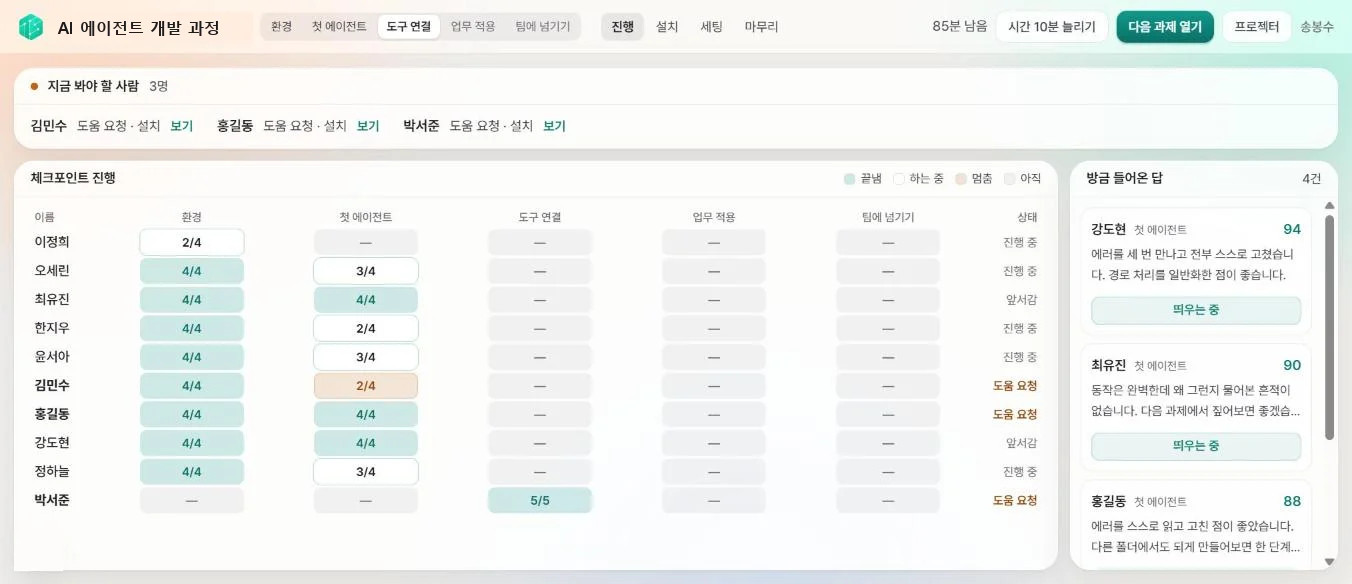
Who is stuck shows first
The instructor sees every learner's progress and help requests on one screen.
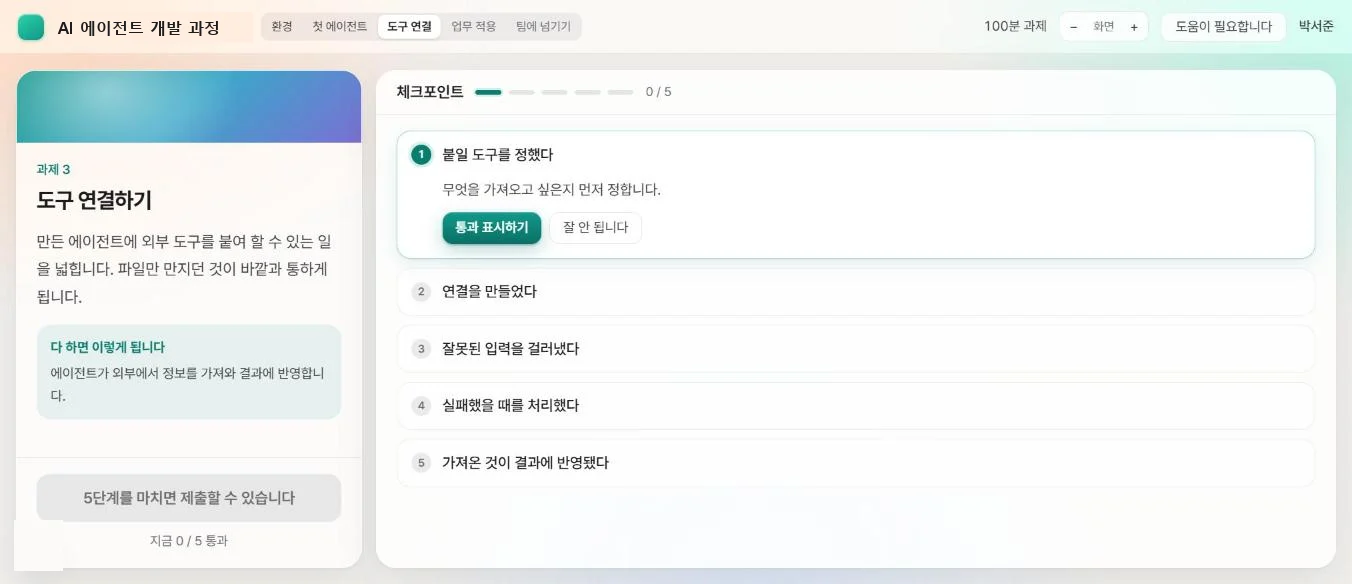
Checkpoints and grading
Each step is checked off, and submissions are graded by AI with instant feedback.
Training paperwork, automatic
Attendance, completion list, results report and certificates are ready when the session ends.
When this fits
- Running hands-on AI training across several classes
- When one instructor has to lead about ten people
- When you need a results report and proof of completion
Technically
Deployment
Your data can stay inside the company
Cloud, hybrid or air-gapped. The structure is the same, so you can move later.
Cloud
For everyday business documents. Uses the AI your company already contracts.
Hybrid
For data containing customer or transaction details. Originals stay in-house; only answers come from outside.
Closed network
For data that cannot leave. Runs entirely on AI inside your own servers, with no external connection.
Technology we use
- LangGraph
- Agentic RAG
- MCP
- Qdrant · ChromaDB
- Hybrid Search
- Google Cloud
- AWS
- Firebase
- BigQuery
- Next.js · Electron
- Python · TypeScript
- Playwright
FAQ
Questions about this service
TS AI Gateway becomes the company’s single door to AI. It masks or blocks confidential data before it leaves, records who used what, and tracks usage and cost by department — and stays in place when models change.
TS AI Engine only references your material and declines to answer when it cannot find a source document. Each answer shows which documents it used so a person can check.
Choose cloud, hybrid (originals stay inside) or fully closed network per data type. All three share one structure, so you can move later.
Let us decide together which to start with
Tell us which systems you use and whether data may leave the company. That is enough.